
史上最全Android应用角标适配方法
本文作者
作者:孙强Jimmy
链接:
https://www.jianshu.com/p/2566fdebcae4
本文由作者授权发布。
Android 8.0之前原生是不支持应用角标的,是各个手机厂商自己在系统中实现的应用角标,并且部分厂商提供了设置的方式,所以需要对各个厂商的系统进行适配。
GitHub地址:
https://github.com/jimmysuncpt/AppBadge
下面是针对各个手机厂商的系统进行适配的原理。
公用方法
在下面的实现代码中,有很多公用的代码,我们提取出来一些公用方法,代码如下:
private static String getLauncherClassName(Context context) {
    ComponentName launchComponent = getLauncherComponentName(context);
    if (launchComponent == null) {
        return "";
    } else {
        return launchComponent.getClassName();
    }
}

private static ComponentName getLauncherComponentName(Context context) {
    Intent launchIntent = context.getPackageManager().getLaunchIntentForPackage(context
            .getPackageName());
    if (launchIntent != null) {
        return launchIntent.getComponent();
    } else {
        return null;
    }
}
小米(支持)
小米在MIUI6及以上版本中是通过发送通知来设置角标的。当APP向通知栏发送了一条通知 (通知不带进度条并且用户可以删除的),那么桌面APP icon角标就会显示1。
此时app显示的角标数是和通知栏里app发送的通知数对应的,即向通知栏发送了多少通知就会显示多少角标。
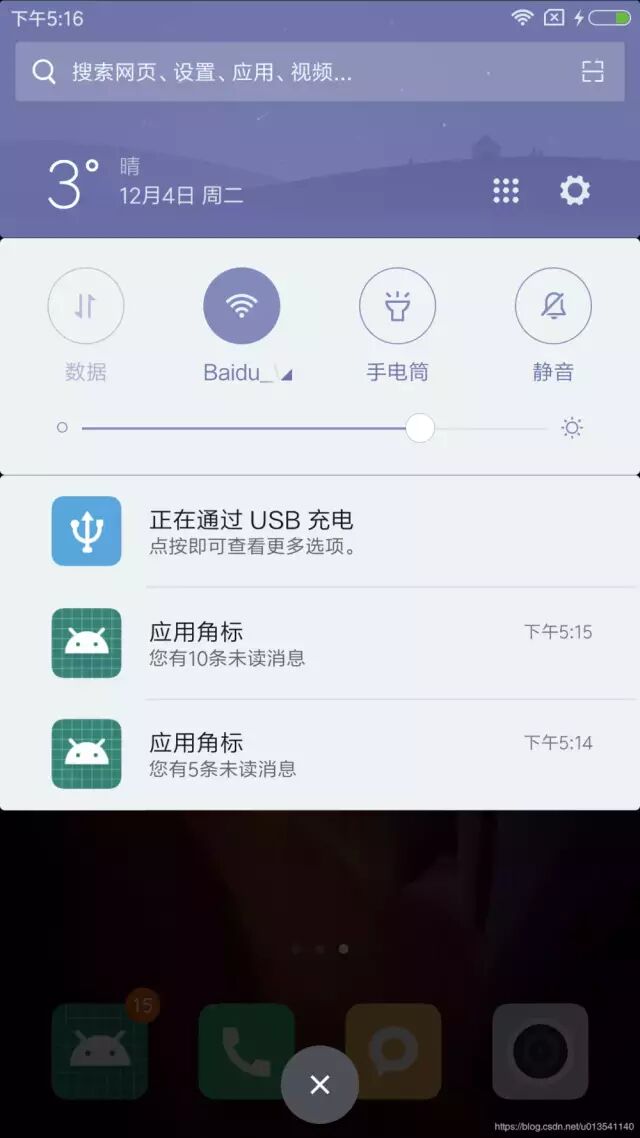
可以通过反射机制来定义每次通知的消息个数,应用的角标数为每条通知定义的通知个数的总和,如下图所示:
我们发送了两条通知,一条通知为5个消息,一条为10个消息,应用角标显示为15个。此时,如果用户点击或移除掉5条消息的那个通知,应用角标会变成10。
另外,仅在APP在后台时收到通知会显示角标,而APP在前台时不会显示,APP被杀掉后通知及角标消失。
实现代码:
public static boolean setNotificationBadge(int count, Context context) {
    NotificationManager notificationManager = (NotificationManager) context.getSystemService
            (Context.NOTIFICATION_SERVICE);
    if (notificationManager == null) {
        return false;
    }
    if (Build.VERSION.SDK_INT >= Build.VERSION_CODES.O) {
        // 8.0之后添加角标需要NotificationChannel
        NotificationChannel channel = new NotificationChannel("badge", "badge",
                NotificationManager.IMPORTANCE_DEFAULT);
        channel.setShowBadge(true);
        notificationManager.createNotificationChannel(channel);
    }
    Intent intent = new Intent(context, MainActivity.class);
    PendingIntent pendingIntent = PendingIntent.getActivity(context, 0, intent, 0);
    Notification notification = new NotificationCompat.Builder(context, "badge")
            .setContentTitle("应用角标")
            .setContentText("您有" + count + "条未读消息")
            .setLargeIcon(BitmapFactory.decodeResource(context.getResources(), R.mipmap
                    .ic_launcher))
            .setSmallIcon(R.mipmap.ic_launcher_round)
            .setAutoCancel(true)
            .setContentIntent(pendingIntent)
            .setChannelId("badge")
            .setNumber(count)
            .setBadgeIconType(NotificationCompat.BADGE_ICON_SMALL).build();
    // 小米
    try {
        Field field = notification.getClass().getDeclaredField("extraNotification");
        Object extraNotification = field.get(notification);
        Method method = extraNotification.getClass().getDeclaredMethod("setMessageCount", int
                .class);
        method.invoke(extraNotification, count);
    } catch (Exception e) {
        e.printStackTrace();
    }
    notificationManager.notify(notificationId++, notification);
    return true;
}
参考链接:
https://dev.mi.com/docs/appsmarket/technical_docs/badge/
https://dev.mi.com/console/doc/detail?pId=939
华为(支持)
可以通过ContentResolver方法直接设置应用角标,且应用在前台和被杀掉后仍可显示。
实现代码:
private static boolean setHuaweiBadge(int count, Context context) {
    try {
        String launchClassName = getLauncherClassName(context);
        if (TextUtils.isEmpty(launchClassName)) {
            return false;
        }
        Bundle bundle = new Bundle();
        bundle.putString("package", context.getPackageName());
        bundle.putString("class", launchClassName);
        bundle.putInt("badgenumber", count);
        context.getContentResolver().call(Uri.parse("content://com.huawei.android.launcher" +
                ".settings/badge/"), "change_badge", null, bundle);
        return true;
    } catch (Exception e) {
        e.printStackTrace();
        return false;
    }
}
参考链接:
https://developer.huawei.com/consumer/cn/devservice/doc/30802
OPPO(不支持)
旧款的OPPO手机有两种方法设置,没有测试机测试,不知道是否可行,实现代码如下:
private static boolean setOPPOBadge(int count, Context context) {
    try {
        Bundle extras = new Bundle();
        extras.putInt("app_badge_count", count);
        context.getContentResolver().call(Uri.parse("content://com.android.badge/badge"),
                "setAppBadgeCount", String.valueOf(count), extras);
        return true;
    } catch (Exception e) {
        e.printStackTrace();
        return false;
    }
}
private static boolean setOPPOBadge2(int count, Context context) {
    try {
        Intent intent = new Intent("com.oppo.unsettledevent");
        intent.putExtra("packageName", context.getPackageName());
        intent.putExtra("number", count);
        intent.putExtra("upgradeNumber", count);
        PackageManager packageManager = context.getPackageManager();
        List<ResolveInfo> receivers = packageManager.queryBroadcastReceivers(intent, 0);
        if (receivers != null && receivers.size() > 0) {
            context.sendBroadcast(intent);
        } else {
            Bundle extras = new Bundle();
            extras.putInt("app_badge_count", count);
            context.getContentResolver().call(Uri.parse("content://com.android.badge/badge"),
                    "setAppBadgeCount", null, extras);
        }
        return true;
    } catch (Exception e) {
        e.printStackTrace();
        return false;
    }
}
新款的OPPO仅支持内置应用、微信和QQ显示角标,若要使用角标功能,必须提交申请,审核通过了才能开放,官方给的具体审核标准如下:
申请角标接入规则(应用必须适配OPPO手机,保证角标功能测试通过)
a) 系统应用;
b) 国内外各区域用户量排名Top5的三方即时通讯类应用,且只允许显示即时通信消息类通知(如QQ、微信、facebook、line);
c) OPPO公司内部费商业化及运营性质的办公类型即时通信应用(如Teamtalk);
d) 国内外邮件类应用(各区域各属于用户量第一梯队的应用)。
vivo(不支持)
旧款的vivo手机实现代码:
private static boolean setVivoBadge(int count, Context context) {
    try {
        String launcherClassName = getLauncherClassName(context);
        if (TextUtils.isEmpty(launcherClassName)) {
            return false;
        }
        Intent intent = new Intent("launcher.action.CHANGE_APPLICATION_NOTIFICATION_NUM");
        intent.putExtra("packageName", context.getPackageName());
        intent.putExtra("className", launcherClassName);
        intent.putExtra("notificationNum", count);
        context.sendBroadcast(intent);
        return true;
    } catch (Exception e) {
        e.printStackTrace();
        return false;
    }
}
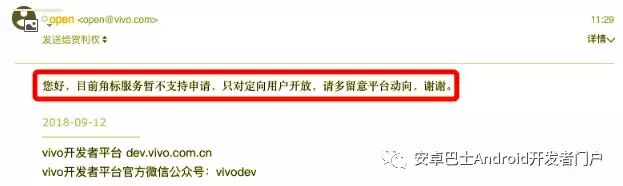
新款的手机也不可行了,如下图:
三星(支持)
可以通过广播机制直接设置应用角标,且应用在前台和被杀掉后仍可显示。
实现代码:
private static boolean setSamsungBadge(int count, Context context) {
    try {
        String launcherClassName = getLauncherClassName(context);
        if (TextUtils.isEmpty(launcherClassName)) {
            return false;
        }
        Intent intent = new Intent("android.intent.action.BADGE_COUNT_UPDATE");
        intent.putExtra("badge_count", count);
        intent.putExtra("badge_count_package_name", context.getPackageName());
        intent.putExtra("badge_count_class_name", launcherClassName);
        context.sendBroadcast(intent);
        return true;
    } catch (Exception e) {
        e.printStackTrace();
        return false;
    }
}
官方不支持。
目前可能仅支持系统应用、微信和QQ,不支持支付宝,未找到设置角标相关文档。
目前仅支持系统应用和微信,甚至不支持QQ。
目前仅支持系统应用。
找不到相关文档。
仅支持通过通知设置角标,且角标数字为收到通知的条数,无法自定义角标数目。
联想ZUK(支持)
实现代码:
private static boolean setZukBadge(int count, Context context) {
    try {
        Bundle extra = new Bundle();
        ArrayList<String> ids = new ArrayList<>();
        // 以列表形式传递快捷方式id,可以添加多个快捷方式id
//        ids.add("custom_id_1");
//        ids.add("custom_id_2");
        extra.putStringArrayList("app_shortcut_custom_id", ids);
        extra.putInt("app_badge_count", count);
        Uri contentUri = Uri.parse("content://com.android.badge/badge");
        Bundle bundle = context.getContentResolver().call(contentUri, "setAppBadgeCount", null,
                extra);
        return bundle != null;
    } catch (Exception e) {
        e.printStackTrace();
        return false;
    }
}
参考链接:
http://developer.zuk.com/detail/12
目前仅支持系统应用和微信,甚至不支持QQ。
HTC(支持)
可通过广播机制直接设置角标。
实现代码:
private static boolean setHTCBadge(int count, Context context) {
    try {
        ComponentName launcherComponentName = getLauncherComponentName(context);
        if (launcherComponentName == null) {
            return false;
        }

        Intent intent1 = new Intent("com.htc.launcher.action.SET_NOTIFICATION");
        intent1.putExtra("com.htc.launcher.extra.COMPONENT", launcherComponentName
                .flattenToShortString());
        intent1.putExtra("com.htc.launcher.extra.COUNT", count);
        context.sendBroadcast(intent1);

        Intent intent2 = new Intent("com.htc.launcher.action.UPDATE_SHORTCUT");
        intent2.putExtra("packagename", launcherComponentName.getPackageName());
        intent2.putExtra("count", count);
        context.sendBroadcast(intent2);

        return true;
    } catch (Exception e) {
        e.printStackTrace();
        return false;
    }
}
诺基亚(支持) 15
可通过通知设置角标数量,和小米类似,不同之处是只要通知栏的通知一直存在,数字就一直存在,且应用在前台仍可通过通知设置。
实现代码:
与小米实现代码相同。
索尼(支持) 16
实现代码:
private static boolean setSonyBadge(int count, Context context) {
    String launcherClassName = getLauncherClassName(context);
    if (TextUtils.isEmpty(launcherClassName)) {
        return false;
    }
    try {
        //官方给出方法
        ContentValues contentValues = new ContentValues();
        contentValues.put("badge_count", count);
        contentValues.put("package_name", context.getPackageName());
        contentValues.put("activity_name", launcherClassName);
        SonyAsyncQueryHandler asyncQueryHandler = new SonyAsyncQueryHandler(context
                .getContentResolver());
        asyncQueryHandler.startInsert(0, null, Uri.parse("content://com.sonymobile.home" +
                ".resourceprovider/badge"), contentValues);
        return true;
    } catch (Exception e) {
        try {
            //网上大部分使用方法
            Intent intent = new Intent("com.sonyericsson.home.action.UPDATE_BADGE");
            intent.putExtra("com.sonyericsson.home.intent.extra.badge.SHOW_MESSAGE", count > 0);
            intent.putExtra("com.sonyericsson.home.intent.extra.badge.ACTIVITY_NAME",
                    launcherClassName);
            intent.putExtra("com.sonyericsson.home.intent.extra.badge.MESSAGE", String
                    .valueOf(count));
            intent.putExtra("com.sonyericsson.home.intent.extra.badge.PACKAGE_NAME", context
                    .getPackageName());
            context.sendBroadcast(intent);
            return true;
        } catch (Exception e1) {
            e1.printStackTrace();
            return false;
        }
    }
}

static class SonyAsyncQueryHandler extends AsyncQueryHandler {
    SonyAsyncQueryHandler(ContentResolver cr) {
        super(cr);
    }
}
参考链接:
https://github.com/sonyxperiadev/home-badge
原生Android(部分支持,无法直接显示数目) 16
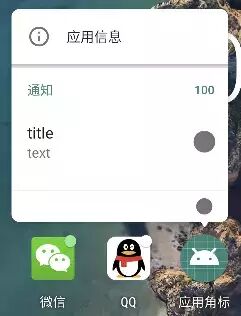
Android 8.0及之后的版本Google官方API支持通过发送系统通知的方式设置应用角标,但是不支持显示数量,而是一个小点儿,如下图所示。
在发送通知时可以设置消息数量,部分手机在长按图标时会显示所有通知设置的数量的总和。如上图所示,该示例中我们发送了两条通知,一条设置消息数量为88,一条为12,所以总和显示为100。
实现代码:
与小米实现代码相同。
参考链接:
https://developer.android.com/training/notify-user/badges
最后推荐一下我做的网站,玩Android: wanandroid.com ,包含详尽的知识体系、好用的工具,还有本公众号文章合集,欢迎体验和收藏!
推荐阅读:
Flutter 面试知识点集锦
推荐 3 个走心项目
如何造好轮子?编写 Android Library 的最佳实践

扫一扫 关注我的公众号
如果你想要跟大家分享你的文章,欢迎投稿~
┏(^0^)┛明天见!
相关文章:
APP资讯 你还在为找不到秀场高清图片而烦恼吗? 快来这里看看!
这代安卓机特别耗电?聊聊安卓应用64位的问题
草莓源码网祝大家元旦快乐!
天天快报来了,其他泛资讯类app还有机会么?
深蓝汽车app(内附攻略)
【劲突破围】指标副图选指标源码{免费分享}支持手机电脑使用
设计师修图必备21款插件合集(支持Win+Mac)
(免费领取)2019最新50款PS插件合集【第13期】
强到离谱,2025年浏览器必装插件,国内无限制使用
熬夜必追短剧《暖巷人家》完整版1-73集/大结局/合集
口碑极佳的iOS App,小众却不为人知,让iPhone好用数倍!
淘宝天猫秒杀插件!双十一必备插件!
插件合集「35」: 11 个免费的小插件集合
比亚迪APP开启“驾驶辅助报告”内测!附:非内测车主提前尝鲜攻略!
DeepTech发布全新硬科技商业资讯APP,跟上!
VSCode必装插件清单:这10款让你效率翻倍,告别选择困难!
IDEA 必备插件:一款快速解决 Maven 依赖冲突的神器!
短剧《天才医仙》完整/全集/大结局
【粉笔精选热点】规范微短剧发展 让小作品有大意义
HD很好的热门短剧《我在荒年靠系统逆袭》1-89(完整版/后续/大结局)不删减版
通达信筹码一致指标源码详解分享(1主1副1选)
十款CAD达人必备的插件,你都装了吗?
华为鸿蒙将不再兼容安卓应用,多家互联网公司急招开发!
稀缺资源,免费提供2025年度最牛AE插件合集(含安装教程),全能型人才必备!
《源代码》2 |当聪明孩子“不听话”:从盖茨的成长看教育的另一种可能
手机*App中的顶流全网最强没有之一
源码获取方法(例程与定制)
最实用的论文/生物/医学工具资源免费下载
插件合集,解决iOS系统痛点!
特效必装插件-红巨星粒子特效AE插件包Red Giant Trapcode Suite 15.1.2 Win/Mac
新短剧必看! 4 部抓马剧,码住蹲点冲!
CAD插件大合集(免费)
免费!最新豆包生图去水印插件,抓紧收藏!
未播先火!这7部红果微短剧预约爆了,闺蜜穿书、仙侠大女主、替嫁总裁…熬夜清单来了!
绝对必备插件!实现 Obsidian 「网址书签」功能!
插件更新 | 全网最实用的ArcGIS国土插件免费授权啦!可一键加载最新亚米级卫星图源
资讯丨iOS限免App:语音转文字应用Just Talk!丨三星S10+真机首次现身丨华为P30 Pro关键信息泄露
1月1日热门短剧天花板推荐上新预告!
Chrome必装插件
短剧超高人气真情侣“落日雨辉CP”13搭作品大盘点,你看过几部?
十款SU2025必备插件,你确定都装了吗?(第361期)
【资讯】广发易淘金APP金融科技战略 加速平台智能化和数据化建设
PR AE Ps 插件合集领取(抖音AE模板-三维视差图片开场片头)
赶紧自查!22款App及SDK强制自动续费、过度索取权限,已被通报
插件合集「10」: 10 个免费的小插件集合
2025最新超全PS插件合集8.0版本,一键安装免费使用
红果微短剧杀疯了!这3部热播黑马短剧,太上头了,熬夜必追!
Grasshopper常用插件汇总
京东购物app官方下载
最新免费中文版Nik 5.5滤镜插件全套下载

服务热线